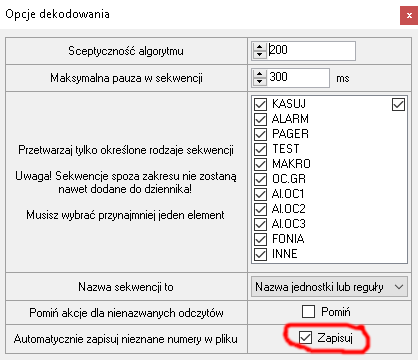
Witam, dziś wywaliło crash i zresetowało wszystkie województwa, powiaty i jednostki. Więc trzeba namierzać od początku. Wiadomo co mogło być powodem?
08/13/2025 07:42:20 - Got Fatal exception
System.InvalidOperationException: Collection was modified; enumeration operation may not execute.
at System.ThrowHelper.ThrowInvalidOperationException(ExceptionResource resource)
at System.Collections.Generic.List`1.Enumerator.MoveNextRare()
at System.Collections.Generic.List`1.Enumerator.MoveNext()
at System.Linq.Enumerable.WhereListIterator`1.MoveNext()
at System.Linq.Enumerable.Count[TSource](IEnumerable`1 source)
at <U+202E><U+202B><U+202D><U+202D><U+202B><U+202A><U+202D><U+202B><U+202B><U+202D><U+202E><U+202B><U+202A><U+202B><U+202E><U+202A><U+202E>.get_Count()
at System.Collections.ObjectModel.Collection`1.get_Count()
at System.Windows.Forms.CurrencyManager.get_Count()
at System.Windows.Forms.DataGridViewCell.GetValue(Int32 rowIndex)
at System.Windows.Forms.DataGridViewTextBoxCell.GetPreferredSize(Graphics graphics, DataGridViewCellStyle cellStyle, Int32 rowIndex, Size constraintSize)
at System.Windows.Forms.DataGridViewCell.GetPreferredHeight(Int32 rowIndex, Int32 width)
at System.Windows.Forms.DataGridViewCell.OnCellDataAreaMouseEnterInternal(Int32 rowIndex)
at System.Windows.Forms.DataGridViewCell.OnMouseMoveInternal(DataGridViewCellMouseEventArgs e)
at System.Windows.Forms.DataGridView.OnCellMouseMove(DataGridViewCellMouseEventArgs e)
at System.Windows.Forms.DataGridView.UpdateMouseEnteredCell(HitTestInfo hti, MouseEventArgs e)
at System.Windows.Forms.DataGridView.OnMouseMove(MouseEventArgs e)
at System.Windows.Forms.Control.WmMouseMove(Message& m)
at System.Windows.Forms.Control.WndProc(Message& m)
at System.Windows.Forms.DataGridView.WndProc(Message& m)
at System.Windows.Forms.Control.ControlNativeWindow.OnMessage(Message& m)
at System.Windows.Forms.Control.ControlNativeWindow.WndProc(Message& m)
at System.Windows.Forms.NativeWindow.DebuggableCallback(IntPtr hWnd, Int32 msg, IntPtr wparam, IntPtr lparam)
at System.Windows.Forms.UnsafeNativeMethods.DispatchMessageW(MSG& msg)
at System.Windows.Forms.Application.ComponentManager.System.Windows.Forms.UnsafeNativeMethods.IMsoComponentManager.FPushMessageLoop(IntPtr dwComponentID, Int32 reason, Int32 pvLoopData)
at System.Windows.Forms.Application.ThreadContext.RunMessageLoopInner(Int32 reason, ApplicationContext context)
at System.Windows.Forms.Application.ThreadContext.RunMessageLoop(Int32 reason, ApplicationContext context)
at System.Windows.Forms.Application.RunDialog(Form form)
at System.Windows.Forms.Form.ShowDialog(IWin32Window owner)
at System.Windows.Forms.Form.ShowDialog()
at JWW\,\*\,ZM\*`~FUE$NkA}%=xXT".<U+202B><U+202B><U+202D><U+202E><U+202E><U+202C><U+202B><U+202C><U+202A><U+202B><U+202B><U+202C><U+202E><U+202D><U+202C><U+202D><U+202D><U+202E>(Object , EventArgs )
at System.Windows.Forms.ToolStripItem.RaiseEvent(Object key, EventArgs e)
at System.Windows.Forms.ToolStripMenuItem.OnClick(EventArgs e)
at System.Windows.Forms.ToolStripItem.HandleClick(EventArgs e)
at System.Windows.Forms.ToolStripItem.HandleMouseUp(MouseEventArgs e)
at System.Windows.Forms.ToolStripItem.FireEventInteractive(EventArgs e, ToolStripItemEventType met)
at System.Windows.Forms.ToolStripItem.FireEvent(EventArgs e, ToolStripItemEventType met)
at System.Windows.Forms.ToolStrip.OnMouseUp(MouseEventArgs mea)
at System.Windows.Forms.ToolStripDropDown.OnMouseUp(MouseEventArgs mea)
at System.Windows.Forms.Control.WmMouseUp(Message& m, MouseButtons button, Int32 clicks)
at System.Windows.Forms.Control.WndProc(Message& m)
at System.Windows.Forms.ScrollableControl.WndProc(Message& m)
at System.Windows.Forms.ToolStrip.WndProc(Message& m)
at System.Windows.Forms.ToolStripDropDown.WndProc(Message& m)
at System.Windows.Forms.Control.ControlNativeWindow.OnMessage(Message& m)
at System.Windows.Forms.Control.ControlNativeWindow.WndProc(Message& m)
at System.Windows.Forms.NativeWindow.DebuggableCallback(IntPtr hWnd, Int32 msg, IntPtr wparam, IntPtr lparam)
at System.Windows.Forms.UnsafeNativeMethods.DispatchMessageW(MSG& msg)
at System.Windows.Forms.Application.ComponentManager.System.Windows.Forms.UnsafeNativeMethods.IMsoComponentManager.FPushMessageLoop(IntPtr dwComponentID, Int32 reason, Int32 pvLoopData)
at System.Windows.Forms.Application.ThreadContext.RunMessageLoopInner(Int32 reason, ApplicationContext context)
at System.Windows.Forms.Application.ThreadContext.RunMessageLoop(Int32 reason, ApplicationContext context)
at System.Windows.Forms.Application.Run(Form mainForm)
at <U+202E><U+202E><U+202B><U+202D><U+202D><U+202B><U+202B><U+202B><U+202E>.<U+202E><U+202D><U+202C><U+202D><U+202D><U+202A><U+202E><U+202D><U+202E><U+202C><U+202A><U+202E><U+202E>()